
TS School5.1.132 - Download
You'll be able to download in few seconds.
Publisher Description
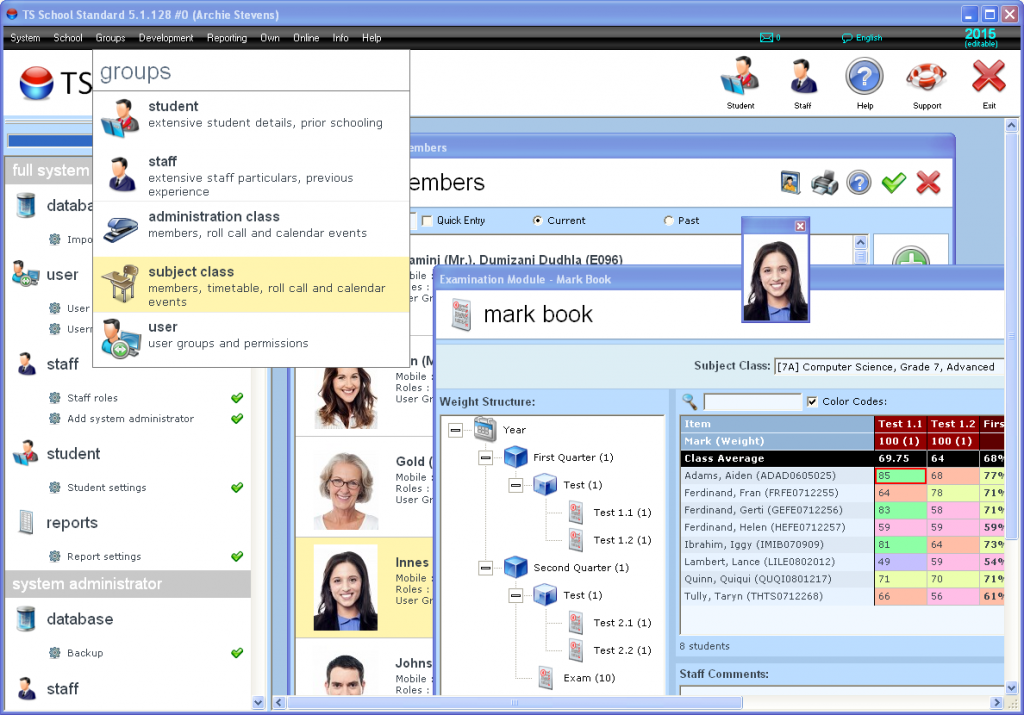
Free school administration application by Time Software. TS School Standard provides schools with a fully-functional school administration software application absolutely free of charge. Assign students and staff to classes for administration purposes, indicating which subjects, if any, are taught. Import your existing school data with ease. Have database backups automatically created for you, which you can restore at any time. Print from many default mail-merged documents. Set up tests, enter marks, finalize terms and churn out your own-designed report cards with ease. Assign images to students, staff and schoolhouses. Have TS School in your own language. Readily available student and staff medical details, including emergency numbers. Print from the hundreds of built-in reports. Enter school particulars. Set up of school departments, schoolhouses and venues. Enter and view extensive staff, spouse and next of kin details. Enter and view extensive student, guardian and guardian spouse details. Assign students and staff to classes for tuition purposes, indicating tuition times, subjects and venues. Set up grades, subjects and the levels on which subjects are taught. Set up subject combinations, school courses and the order in which subjects will appear on documents. Courses can also be set up and students assigned to them. Produce multiple-week, multi-shift timetables for subject classes, students and staff, having the system check for any conflicts. Control user assess by assigning your users to user groups. Download your copy today!
About TS School
This Computer program is available in English. It was last updated on 29 September, 2026. TS School is compatible with the following operating systems: Windows.
The company that develops TS School is Time Software. The latest version released by its developer is 5.1.132.
The download we have available for TS School has a file size of 62.9 MB. Just click the green Download button above to start the downloading process. The program is listed on our website since 2015-07-29 and was downloaded 0 times. We have already checked if the download link is safe, however for your own protection we recommend that you scan the downloaded software with your antivirus. Your antivirus may detect the TS School as malware if the download link is broken.
How to install TS School on your Windows device:
- Click on the Download button on our website. This will start the download from the website of the developer.
- Once the TS School is downloaded click on it to start the setup process (assuming you are on a desktop computer).
- When the installation is finished you should be able to see and run the program.
Program Details
System requirements
Download information
Pricing
Version History
version 5.1.132
posted on 2015-07-29
Disclaimer
External Download
We do not host TS School on our servers. We did not scan it for viruses, adware, spyware or other type of malware. This app is hosted by the software publisher and passed their terms and conditions to be listed there. We recommend caution when installing it.
The external download link for TS School is provided to you by apps112.com without any warranties, representations or guarantees of any kind, so access it at your own risk.
If you have questions regarding this particular app contact the publisher directly. For questions about the functionalities of apps112.com contact us.
